ReplyWink documentation
How to write AI-assisted replies on X (Twitter)
Use ReplyWink as a decision and writing aid while browsing X. Read the post, inspect why it was highlighted, generate two options, and edit one into a reply you would stand behind. ReplyWink never sends it for you.
On this page
Choose posts where you can add something
Start with a topic you understand and an audience you want to talk with. In ReplyWink Setup, describe your positioning, products, and enabled goals. The side panel’s where to hunt links open your saved searches on X; you choose what to browse.
A useful reply might answer a concrete question, offer a relevant example, or clarify a tradeoff. A large audience alone does not make a post a good fit. Before drafting, ask whether you can contribute something beyond praise or a link to your product.
Understand the highlight and reason
ReplyWink applies local filters before asking your AI provider to score candidates. Those filters consider engagement, post age, author cooldown, your own handle, and posts marked replied. Replies rather than root posts are also filtered by the scoring gate. Posts rejected locally do not need an AI scoring call.
Remaining candidates are scored in batches against your configured goals. A visible reason bar explains the result, using labels such as worth a reply or maybe. Treat the reason as a suggestion to examine, not a prediction of reach, sales, or account safety.
- Too little appears: check whether your minimum likes or age window excludes the posts you browse.
- Suggestions feel irrelevant: sharpen the descriptions of your enabled goals and account positioning.
- A post disappears after you reply: replied history and cooldowns help avoid repeating the same interaction.
Open the inline draft card
Click the ReplyWink reason bar under an X post. The card appears directly beneath it, with editable reply options and a copy button for each. The two styles are safe and spicier; “spicier” describes the tone, not a guarantee that the reply suits the conversation.
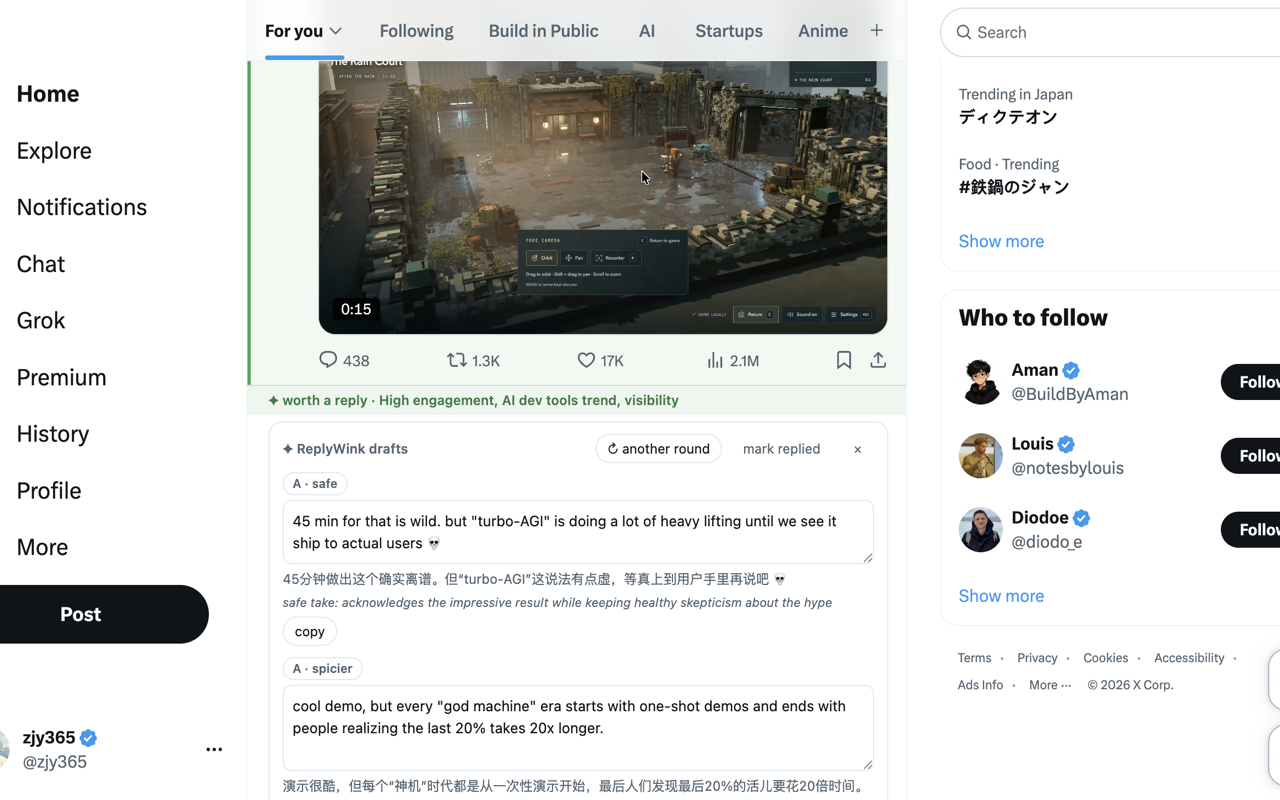
If neither option works, use another round. A successful new generation counts toward the free allowance. Editing the text yourself does not require another generation.
Make the reply sound like you
Use the Replies settings tab to manage reply templates and preferences. Describe the voice you actually use: how direct you are, whether you use humor, and what you want to avoid. Then review the draft for this specific conversation.
For example, if a founder asks how to reduce onboarding drop-off, do not publish a made-up result such as “we doubled conversion” unless it is your real experience. A more grounded response could be: “where do people stop—before connecting their account, or after? those need different fixes.” This is an illustrative editing example, not a claimed product outcome.
Remove generic praise, unsupported facts, unnecessary questions, and irrelevant promotional links. Keep the part that directly addresses the post. A draft that is technically grammatical may still be wrong for your audience.
Use translations as a reading aid
Under Replies → Translation language, choose a language to display below new English replies, or select Off. The copy button copies the original reply, not the translation. Changing this preference hides previous translations without generating replacements or using the draft allowance; the new preference applies to future generations.
Copy, post, and mark replied are separate actions
- Copy: copies your selected, edited draft and records a copied item. On X, the highlight remains because you have not said you posted yet.
- Post yourself: paste into X, review the destination and text, and use X’s own posting control.
- Mark replied: records that you answered the post and removes its highlight/card. Only do this after actually replying.
The side panel’s recent section reflects these local records. ReplyWink does not automatically infer that a clipboard action became a published reply.
Keep the limits clear
Your configured daily reply goal and the free generation allowance measure different things. A free user can generate five pairs of draft options per rolling 24 hours; regenerating also uses that allowance. A paid license removes the extension’s generation cap but not your provider’s bills or rate limits.
Follow X’s rules and use your judgment about timing, relevance, and frequency. ReplyWink does not promise followers, engagement, leads, or immunity from moderation. If you have not connected a provider yet, start with the installation and first-reply guide.